
Access Denied
IMPORTANT! If you’re a store owner, please make sure you have Customer accounts enabled in your Store Admin, as you have customer based locks set up with EasyLockdown app. Enable Customer Accounts
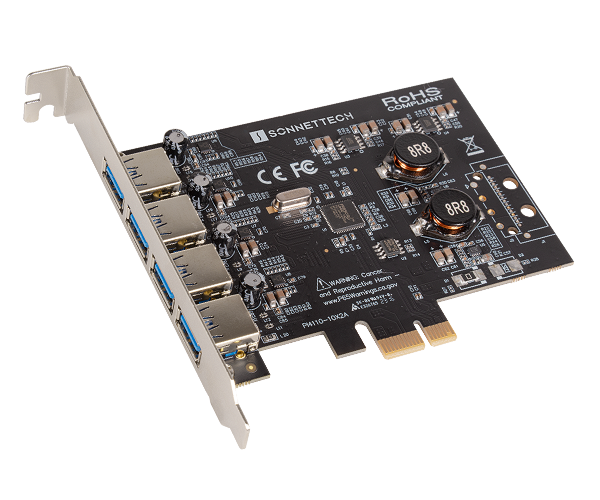
Allegro Type-A USB 3.2 4-Port PCIe Card (4-ports • USB-A 5 Gbps/USB 3.2 Gen 1 • USB charging)
Part No. USB3-4PM-E

Add Four USB-A 5 Gbps Ports
Allegro Type-A USB 3.2 4-Port PCIe Card
4-port, SuperSpeed USB-A 5 Gbps PCIe Card with USB Charging
Up to Ten Times the Performance of USB 2.0
Upgrade to SuperSpeed Performance. Your computer’s USB 2.0 ports are perfectly adequate for connecting mice, keyboards, and printers, but if you need to connect external storage drives, USB 2.0 ports are underpowered in more ways than one — limiting data transfer speeds to around 25–30 MB/s, they can hardly be called “high performance”. Most drives available today include faster USB interfaces and offer significantly better performance than USB 2.0-equipped drives. Though you can connect them to your computer’s USB 2.0 ports, their performance would be reduced by as much as 85 percent. Don’t settle for slow performance, install Allegro Type-A USB 3.2 PCIe 4-Port card to instantly add four USB-A 5 Gbps ports to your system.
PCIe Interface
The Allegro features a PCIe 2.0 bus interface to take advantage of your computer’s fast expansion card slots. This card installs easily into any PCIe slot that supports a full-height card, features hot-pluggable and hot-swappable device connection support with automatic device configuration, and works with all USB-IF compliant USB peripherals.
Powerful Ports
Sonnet specially engineered the Allegro PCIe card to provide extra power through its ports without the need for you to connect an auxiliary power cable. Delivering up to 10W of power, this Sonnet solution supports USB 3.0 bus-powered devices without the need to connect an additional AC power adapter. The Allegro also supports the USB 3.0 charging specification that enables you to simultaneously charge and sync your iPad, iPhone, or other device that supports USB 3.0 charging.
Add Four USB 3.0 Ports to Older Mac Computers with USB 2.0
Got an older Mac with USB 2.0 ports, no PCIe slots, and a Thunderbolt port? The Allegro is a great way to add four USB-A 5 Gbps ports to a Sonnet Thunderbolt expansion system.
Perfect for the Extra Slot In Your Multi-Slot Thunderbolt System
Have a multi-slot Thunderbolt expansion system with an open slot? Installing an Allegro Type-A USB 3.2 PCIe 4-Port card is an excellent way to inexpensively add four SuperSpeed USB-A 5 Gbps ports to your computer.
Key Features & Specifications
- Adds USB 3.2 Gen 1 Connectivity – Adds four USB-A 5 Gbps ports to your Mac, Windows, or Linux computer or Thunderbolt expansion system with PCIe slots.
- Speedy Performance – Transfers data up to 10x faster than over USB 2.0 connections.
- Super-Powered Ports – Supports USB 3.0 bus-powered devices with up to 2.0A.
- Charging Ports – Supports USB 3.0 charging port handshake, and will simultaneously synch and charge iPads and other devices that support USB 3.0 charging at 1.5A per device.
- Broad USB Device Support & Compatibility – Supports storage, hubs, and other USB-IF compliant devices; compatible with USB 2.0 devices.
- Supports Hot-Swappable Device Connection – Plug in and disconnect peripherals without shutting off your computer.
- Add USB 3 to Thunderbolt Expansion Systems – Add four USB-A 5 Gbps ports to Thunderbolt expansion systems.
- Easy Installation – Quick and easy user installation into any available PCIe slot of your computer.
- Compatibility – Mac, Windows, and Linux computers and Thunderbolt expansion systems. See Tech Specs for details.
-
Package Contents – Allegro Type A USB 3.2 4-Port PCIe Card; documentation.
- Warranty – 2-year product warranty.
- Customer Support – Lifetime technical support.
- The Sonnet Advantage – Innovating technology since 1986.
Note: Computers and accessories featured in photos are not included with the product. Product specifications are subject to change without notice.

Product Overview and Tech Specs
Visit: Product Page

Pre-sales Questions?
Contact: sales@sonnettech.com

WARNING: California’s Proposition 65
Share this Product
More from this category

Invalid password
Enter