
Access Denied
IMPORTANT! If you’re a store owner, please make sure you have Customer accounts enabled in your Store Admin, as you have customer based locks set up with EasyLockdown app. Enable Customer Accounts
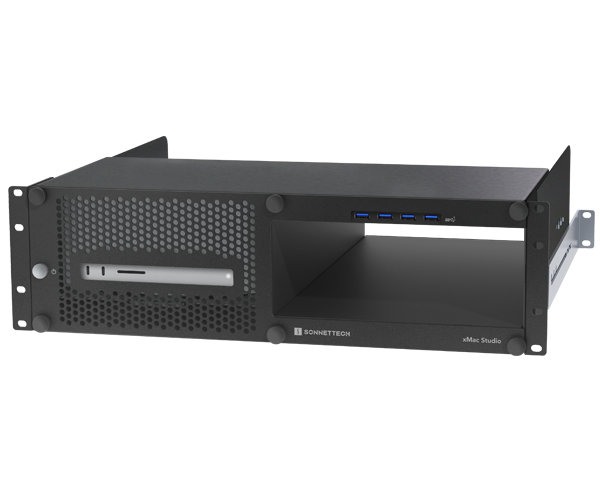
xMac Studio Enclosure System (Add your own expansion module)
Part No. XMAC-STD-0
(Enclosure with open bay for optional expansion module)

Build Your Mac Studio Rack Your Way
xMac Studio
3U Rackmount Enclosure + Modular Expansion Bay
Flexible Rackmounting with Modular PCIe Expansion
A Mac Studio delivers phenomenal processing power, outperforming computers many times its size and price – and includes a robust selection of ports. But how do you integrate a Mac Studio into off-the-desk professional workflows and expand its connectivity beyond what’s available out of the box?
Sonnet xMac Studio integrates a Mac Studio (sold separately) into a compact, rugged steel 3U rackmount enclosure with an optional Thunderbolt™ to PCIe card expansion module to support diverse audio and video application workflows.

Designed for Expansion: Mac Studio + Optional PCIe Card Expansion
For many creative professionals, PCIe card expansion for connecting specialty I/O and processing cards to handle audio and video post-production projects is not an option — it’s a necessity! Sonnet designed xMac Studio for pro workflow flexibility. The xMac Studio securely houses a Mac Studio and provides an expansion bay to add a module at a later date or use a compatible existing Sonnet expansion module.

Control and Connect – Easy Access to Mac Studio and PCIe Card Expansion Module
xMac Studio places your Mac Studio behind a quick and easy to remove front panel. Convenient front panel operation allows you to turn on the computer with its own dedicated front power button, connect USB devices through a 4-port USB-A hub, and access the Studio’s front ports and SD card slot. When equipped with an Echo PCIe card expansion module, three rear panel locking thumbscrews allow you to easily pull out and access the module and PCIe cards through the front without removing the front panel. The xMac Studio design enables you to connect and disconnect cables without needing to remove the computer from the enclosure.
xMac Studio is designed to allow normal WiFi and Bluetooth wireless operation in most configurations (depending on rack type and position in rack), so you can use wireless devices and iOS device control apps.

Cool Design. Go with the Airflow – Supports the Mac Studio Thermal Design.
xMac Studio secures your Mac Studio without trapping it in recirculating hot rack air, supporting its thermal design to keep it as cool in a rack as out on a desk. Ventilation holes on the enclosure’s front panel plus an enclosed chamber beneath the Mac Studio ensures the computer’s ability to draw in cool air through its base, while a completely open back enables it to expel warm air out the back unimpeded.

Space for SSDs – Secure Two Thunderbolt or USB SSDs Under the Mac Studio
xMac Studio provides space beneath the computer to house two Thunderbolt or USB SSDs (sold separately) up to 3.2 inches wide by 0.75 inch tall. Simply remove the rear access panel, apply the supplied adhesive-backed magnet to the bottom of the SSDs, insert the SSDs and connect them to the computer, and then reinstall the panel. The space is also suitable for other thin, bus-powered devices.

Road Trip Ready – Workflows on the Go
Do you need to take your workflow on the road? xMac Studio is a perfect travel solution. Its 16.5-inch mounting depth – plus firm rubber cushions that securely hold your Mac Studio in place during transport – make xMac Studio ideal for use in molded rack cases from Gator Cases, fly racks from SKB Cases, or most any travel rack.

Key Features & Specifications
- Compact and Rugged – 3U rackmount teel enclosures houses Mac Studio with bay for optional expansion module.
- Connects PCIe Card Slots to Mac Studio – With your choice of expansion modules, use high-performance PCIe cards with Mac Studio.
- Makes Your Mac Studio Road-ready – 3U rackmount enclosure with firm rubber cushions securely holds the Mac Studio and Thunderbolt expansion module in place, adding mobility to your workflow.
- Ideal for Use in Server Rooms – Standard mounting holes and included adjustable rack rails enable easy installation into any standard server rack up to 24" deep.
- Front to Back Airflow Management – Supports direct airflow through the enclosure, Mac Studio, and Thunderbolt expansion module to keep them operating as cool in a rack as on a desk, even when xMac Studio is mounted between two other rack-mounted components.
-
Front Panel Power Button and Integrated USB-A Ports – Front panel button enables operation of the computer’s rear-mounted power switch; integrated USB-A hub connects four USB peripherals to the Mac Studio.
- Easy Access – No tools required; removable front panel secured with thumbscrews allows easy installation of and access to the Mac Studio. Secured with three thumbscrews on the back, the Thunderbolt expansion module can be removed and reinstalled through the front of the enclosure without removing the front plate.
- Open Slot and Port Access – Provides access to the computer’s SD card slot and front and back panel ports, enabling you to connect and disconnect cables easily.
- Space for Storage – Behind a covered opening beneath the computer is a space to place two Thunderbolt or USB SSDs (sold separately); two included adhesive-backed magnets secure them in place.
- Compatibility – Compatible with all Mac Studios. See Tech Specs for details.
- Dimensions (WxDxH) – 19 x 16.5 x 5.2 in. (48 x 41.9 x 13.3 cm).
- Weight – 21 lbs (9.53 kg).
- Space for SSD Maximum Height – 0.7 in (18 mm) inserted from rear; 0.9 in (23 mm) inserted from front.
- Package Contents – xMac Studio Enclosure (with expansion bay for optional module); extension rails (for rack depth 16-24 inches); two adhesive-backed magnets; documentation.
- Warranty – 2-year product warranty.
- Customer Support – Lifetime technical support.
-
The Sonnet Advantage – Innovating technology since 1986.
Note: Computers and accessories featured in photos are not included with the product. Product specifications are subject to change without notice.

Product Overview and Tech Specs
Visit: Product Page

Pre-sales Questions?
Contact: sales@sonnettech.com

WARNING: California’s Proposition 65
Share this Product
More from this category


Invalid password
Enter